Internet Without a Landline: When a 5G Router Makes Sense
DSL too slow, fibre not here yet, or only staying for a while? Here's how to tell whether a 5G router is the right internet solution for your home.
This article contains affiliate links (marked with *). If you buy through them, we earn a commission – the price stays the same for you. Learn more
Fast internet doesn’t come out of the wall everywhere. In rural areas DSL can be painfully slow, fibre rollout takes its time, or you move into a place where the line won’t be activated for another few weeks. In situations like these, a 5G router can be a real alternative. But not always. The lynx shows you when it’s worth it and what to watch out for.
How does internet via a 5G router work?
The idea is simple: instead of a phone, cable or fibre line, the router gets its internet from the mobile network. You insert a SIM card, the router connects, and it shares that connection over Wi-Fi and LAN cable with every device in your home. It’s basically a phone hotspot, just with better antennas, more range and ports for your TV, PC or console.
How fast it ends up being depends mainly on two things:
- Coverage at your location: How good is your provider’s 5G or 4G network exactly where the router sits? That can vary noticeably even between the basement and the top floor.
- Your plan: Data allowance, speed caps, and whether the plan is actually meant to be used in a router.
The maximum figures on the spec sheet are theoretical ceilings. What you actually get is decided by the network on site.
When a 5G router is worth it
Holiday home or weekend cabin: Running a landline for a few weeks a year is often impractical. A 5G router with a suitable plan is set up in no time.
Stopgap after a move: It can take weeks for a new line to be activated. With a 5G router you’re online from day one.
Rural home with slow DSL: If your line only manages a few Mbit/s but the local mobile network is well built out, 5G can be much faster.
Backup for working from home: Some 5G routers kick in when the wired line goes down. If your job depends on a stable connection, that’s a useful safety net.
When it probably isn’t
If you already have fast, stable fibre or cable, a 5G router as your main connection usually brings no benefit. It’s also a poor choice if mobile coverage where you live is weak. And if your plan comes with only a small data allowance, it’ll be gone quickly once someone streams shows or downloads big game updates.
Two approaches: classic router or mesh system
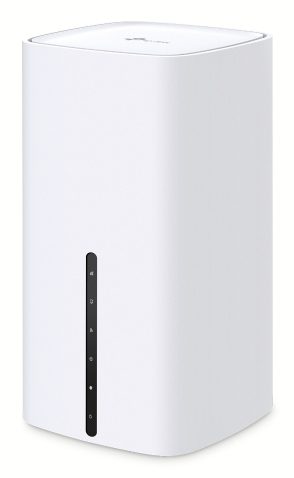
TP-Link Archer NX200: the classic 5G router
The TP-Link Archer NX200 is a compact 5G router with a nano-SIM slot. TP-Link quotes theoretical 5G downloads of up to 4.67 Gbit/s, and it falls back to 4G LTE. Indoors it uses dual-band Wi-Fi 6 in the AX1800 class. For wired devices there are three gigabit ports, one of which doubles as a WAN port. That means you can keep using it as a regular router later, behind a cable, fibre or DSL modem.
The WAN failover feature is worth a look: according to the manufacturer, the mobile connection can step in as a backup when the wired line drops. With EasyMesh you can extend the Wi-Fi using compatible devices.
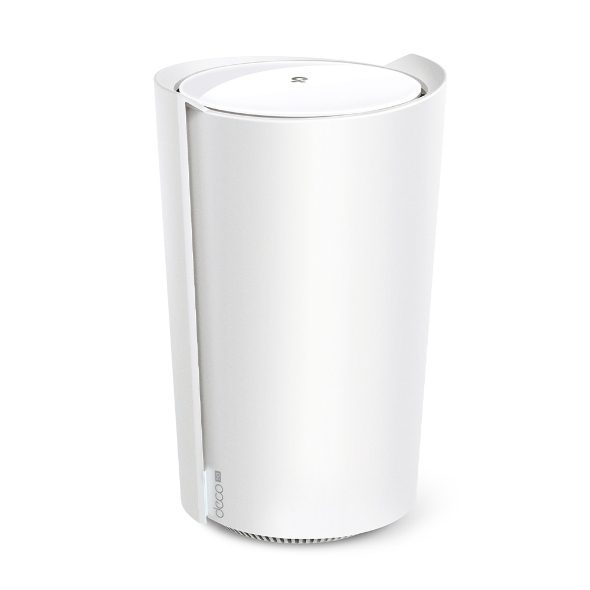
TP-Link Deco X50-5G: 5G with a mesh system behind it
The TP-Link Deco X50-5G also takes a nano-SIM and gets its internet over 5G or 4G. Its Wi-Fi sits one step higher: Wi-Fi 6 in the AX3000 class, which TP-Link rates at up to 2402 Mbit/s on 5 GHz and 574 Mbit/s on 2.4 GHz. You also get one 2.5-gigabit port and two gigabit ports that configure themselves automatically as WAN or LAN.
Its big advantage is that it belongs to the Deco family. TP-Link says all Deco devices work with each other, so you can add more units and build a mesh network for larger homes or multiple floors. If reception is weak, two sockets let you connect external mobile antennas. The HomeShield security features are included in their basic version; the Pro tier requires a subscription.
Quick comparison
| Archer NX200 | Deco X50-5G | |
|---|---|---|
| Mobile | 5G / 4G, nano-SIM | 5G / 4G, nano-SIM |
| Wi-Fi | Wi-Fi 6, AX1800 | Wi-Fi 6, AX3000 |
| LAN ports | 3 x gigabit (1 x WAN/LAN) | 1 x 2.5 gigabit, 2 x gigabit |
| Extending Wi-Fi | EasyMesh | Deco mesh |
| Good fit for | Apartment, holiday home, backup | Larger apartment, house, mesh expansion |
2- to 3-room apartment: The Archer NX200 is often enough here. A single, centrally placed router usually copes well with a compact flat, and the ports cover a TV and a PC.
Detached house or a rambling older building: This is where the Deco X50-5G shines, because you can spread the Wi-Fi across several floors with additional Deco units.
Where to put it
With a 5G router, the first priority isn’t Wi-Fi coverage inside your home but mobile reception at the router. A spot by a window, ideally on an upper floor and facing the nearest cell tower, often beats a corner of the room by a wide margin. Try a few locations and compare how fast and stable the connection is, for example with a speed test.
Checklist before you buy
- Have you checked your provider’s 5G coverage at your address?
- Does your plan have enough or unlimited data?
- Does the plan allow use in a router?
- Do you have the right SIM size (nano-SIM)?
- How big is the area your Wi-Fi needs to cover?
- Do you want to use the router on a wired connection later?
The lynx’s verdict
A 5G router isn’t a cure-all, but in many situations it’s a genuinely good fix: as a stopgap, for a holiday home, with sluggish DSL, or as a backup. What really matters is reception at your location and the right plan. For smaller homes the Archer NX200 is a solid all-rounder; if you need to cover a lot of space, the Deco X50-5G and its mesh system are the better call.